Key Takeaways
- Most barrier gate faults are simple to diagnose: power, trigger, safety device or mechanical wear.
- Clear the lane safely and test from the trigger side first — never bypass safety devices.
- Quarterly maintenance prevents the majority of repeat service calls.
- Factory support with the model and fault code usually yields the fastest fix.
Table of Contents
- Before You Start: Safety First
- Problem 1: Barrier Gate Won't Open (No Power / No Trigger)
- Problem 2: Barrier Gate Won't Close or Stays Up
- Problem 3: Barrier Arm Moves Slowly or Stalls Mid-Travel
- Problem 4: Remote Control Not Working
- Problem 5: Photocell or Loop Detector Keeps Faulting
- Problem 6: Error Codes, Beeps and Indicator Lights
- Problem 7: Manual Release Won't Engage
- Problem 8: Unusual Noise or Vibration During Operation
- Problem 9: Frequent Breakdowns — When to Repair vs Replace
- Preventive Maintenance Checklist
- FAQ
- Conclusion
Why Is Safety First Before You Start?

Every boom barrier troubleshooting session starts the same way: clear the lane before you diagnose anything. A barrier arm stuck across a vehicle lane backs traffic onto the road, blocks delivery vehicles and — worse — can trap a vehicle across a fire route. The manual release is the first tool you should know on your own gate: it is usually a keyed lock or lever on the operator housing that de-clutches the arm from the motor so it can be swung by hand.
If the arm is jammed down and blocking traffic, release it manually and raise it before doing any electrical checks. If the arm is stuck up and there is no security reason to keep it closed, leave it up — traffic keeps moving and nothing is trapped. Never leave a barrier jammed across the only vehicle exit while you wait for a technician.
Second rule: never defeat the safety devices. The photocell, loop detector and obstruction sensing exist so the arm does not come down on a vehicle or a person. If a safety sensor is causing the gate to misbehave, diagnose and fix the sensor — do not tape it over or disconnect it to force the gate to close. On US commercial sites, tampering with entrapment protection also creates liability exposure that a UL 325 inspection would flag immediately.
Third rule: know your limits. Power checks, the manual release, the wall push-button test and cleaning a photocell are safe for facility staff. Spring balance adjustment, motor and gearbox work, limit-switch re-setting and anything inside the control board enclosure are jobs for a qualified technician — boom springs are under heavy load, and a mistake there can be dangerous.
Why Won't the Barrier Gate Open With No Power or Trigger?
This is the most common service call, and in the majority of cases the barrier itself is fine — it is simply not being told to open, or it has no power.
- No power at all. Check the dedicated circuit breaker or fuse for the gate first — a tripped breaker is the single most common dead-barrier cause. Reset it once. If it trips again immediately, stop and call a technician: a repeat trip means a fault in the wiring, control board or motor.
- Wall push-button test. Press the wired push-button or interior control panel button. If the barrier opens and closes cleanly from the button, the gate, motor and board are fine — the fault is in the trigger chain: a dead remote, a reader without power, a faulty keypad or the access controller not sending the open signal.
- Dead backup battery. Many commercial barrier gates run on mains power with a 12V backup battery for power-fail operation. If the battery failed during an earlier power cut, the gate may be running on a drained battery and refuse to move. Check battery voltage — it should hold at least 11V under load.
- Trigger not reaching the gate. If the push-button works but the remote or card reader does not, test a known-good remote, swap the remote battery, and confirm the reader post has power. A reader that lost its link to the controller will read nothing.
If the motor runs but the arm does not move, check whether the manual release was left de-clutched after a previous power failure — this happens more often than you would expect. Re-engage the clutch and retest. If the motor strains but the arm stays put, the problem is mechanical: a slack counter-spring or a slipping drive coupling, both technician jobs. Our DC brushless vs AC motor guide explains why motor type matters for reliability in high-cycle entrances.
Related barrier: Intelligent Barrier Gate — see the model line with reliable drive + trigger options.
Why Won't the Barrier Gate Close or Why Does It Stay Up?
A barrier that opens but refuses to close is almost always a safety-interlock problem, not a drive problem. The controller will not lower the arm while any safety device reports an obstruction.
- Photocell beam blocked or misaligned. The under-arm photocell creates an invisible beam across the lane; if it is dirty, misaligned or a reflector has fallen off, the controller thinks a vehicle or person is in the lane and holds the arm up. Clean the lenses with a soft dry cloth and re-check alignment. This is the single most common “gate stuck up” cause.
- Loop detector faulting. A vehicle loop detector that is always “occupied” (a damaged loop wire, metal sitting on the loop, or drifted sensitivity) tells the controller a car is parked in the lane. Clear the area and test again; if it keeps faulting, the loop or detector needs a technician.
- Obstruction in the arm's path. Branches, signs, snow or debris under the arm physically block the closing travel. Remove the obstruction and retest.
- Drifted limit or timer settings. If the arm closes partway then reverses, or holds open longer than the programmed time, the close-limit switch or hold-open timer has drifted. Limit adjustment is a technician job on most models.
A related symptom — the arm comes down but bounces back up immediately — usually means the safety loop or photocell is triggering as the arm approaches its closed position. Check the loop zone for metal objects and confirm the photocell reflector is still in place.
Related barrier: Intelligent Barrier Gate — units with configurable close cycle and safety logic.
Why Does the Barrier Arm Move Slowly or Stall Mid-Travel?
Slow, laboured movement is the classic symptom of a spring balance problem. The counter-spring carries most of the arm's weight; when it is too loose or too tight, the motor has to fight the imbalance and the arm crawls, stalls or runs in jerky steps.
- Spring tension out of balance. The correct test on most models: with power off and the arm released manually, the arm should hold its position around 45° — if it drops, the spring is too loose; if it flies up, too tight. Spring adjustment is strictly a technician job (the spring is under high load), but knowing the symptom helps you describe the fault accurately.
- Drifted limit positions. If the arm stops short of fully open or fully closed, the travel limits have moved. On modern DC operators this is re-learned via the control panel menu; on AC units the limit cams need physical adjustment.
- Motor or gearbox wear. Grinding, whining or intermittent jerking points to gearbox wear or a failing motor — more common on older AC operators running high daily cycles. This is a replace-the-drive decision; see barrier gate pricing to compare repair versus new-unit economics.
- Voltage drop. Long cable runs or an undersized supply can drop voltage under load, making a DC operator slow and weak. Confirm the supply voltage at the operator while the motor runs.
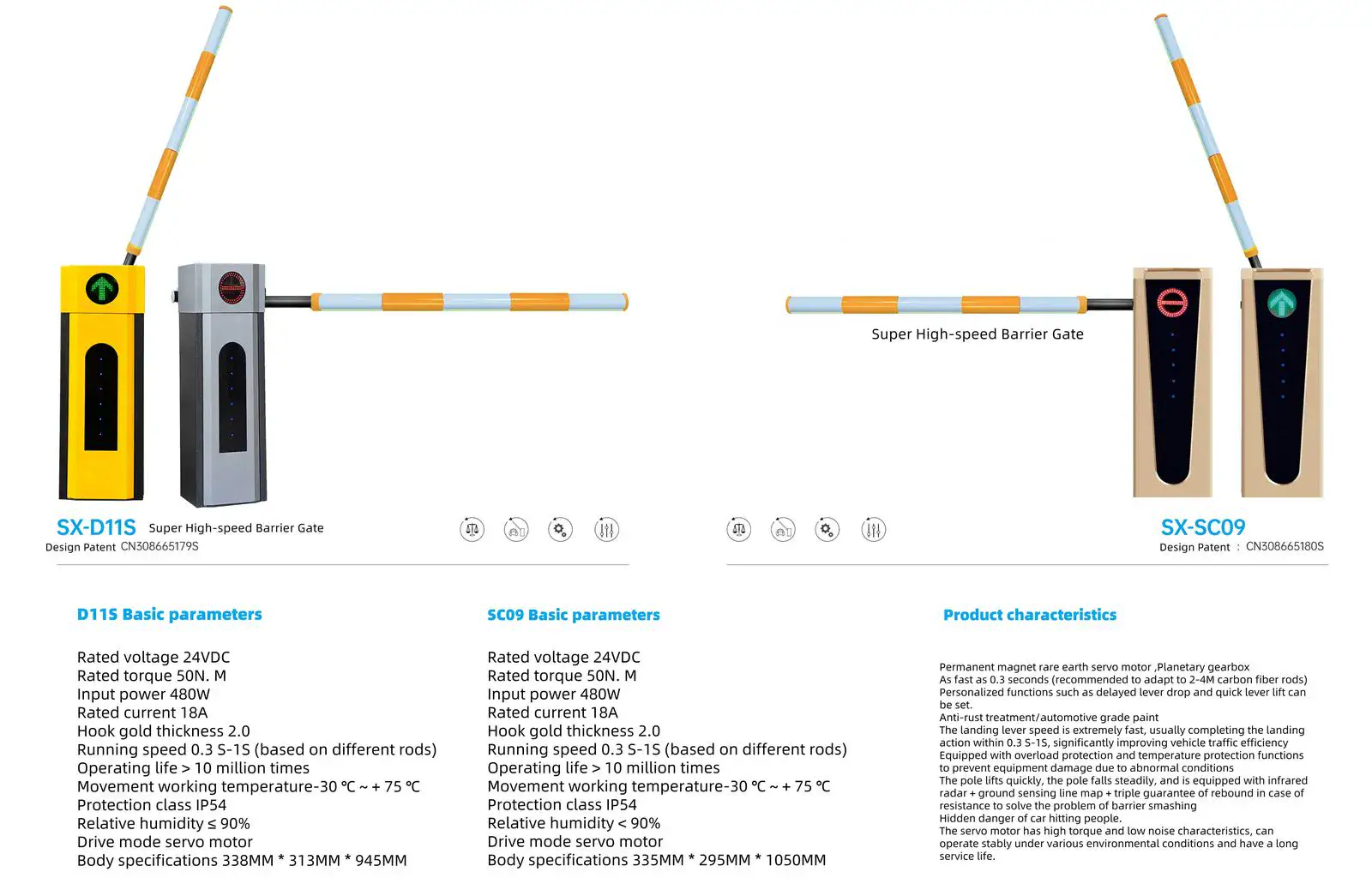
Speed also depends on the operator's design duty: a standard commercial gate opens in 3–6 seconds, while high-speed barrier gates open in 1–2 seconds. If your gate was always slower than the spec sheet, the issue is specification, not a fault.
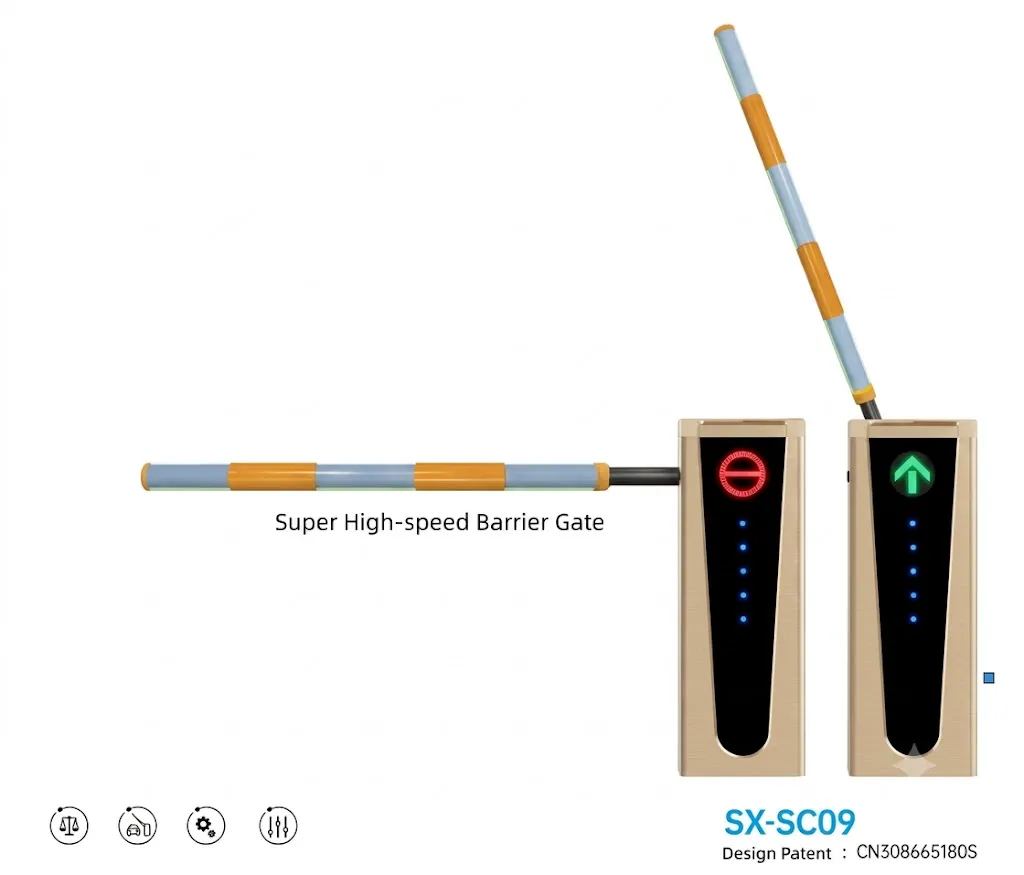
Related barrier: Super High-Speed Barrier Gate — fast drive for applications where speed and cycles matter.
Why Is the Remote Control Not Working?
Remote faults are the most common false alarm in boom barrier troubleshooting — usually the barrier is fine and the remote is the problem.
- Flat battery. The most common cause of all. Swap the battery and retest. Note that many remotes show a red LED even with a weak battery — the LED lights but the range drops to a few meters or nothing.
- De-synced code. If one remote stopped working but others still work, the remote's rolling code has drifted out of sync with the receiver. Most controllers have a re-learn procedure (usually holding a button on the board or a paired master remote); re-pair the remote per the manual.
- Wrong frequency or type. If a new remote simply never worked, check it matches the receiver's frequency (433.92 MHz is the most common) and protocol. A “universal” remote from a hardware store often does not support the rolling-code protocol your gate uses.
- Receiver antenna or interference. Metal enclosures, poor antenna placement or strong local RF interference can shorten range. Move the antenna to a clear position if possible.
For fleet use (delivery drivers, staff), a parking lot access control upgrade to RFID tags or LPR cameras removes remote management headaches entirely — no batteries, no re-pairing, no lost remotes.
Related barrier: Intelligent Barrier Gate — remote + card + LPR integration options.
Why Does the Photocell or Loop Detector Keep Faulting?
These two safety/trigger devices cause more nuisance faults than the entire rest of the gate. Here is how to separate sensor problems from controller problems:
- Photocell: dirty lenses, a knocked-out reflector, misalignment, or water ingress in the housing. Clean, re-align, and if the housing lets in moisture, seal it — repeated photocell faults in rainy seasons usually mean water in the connection.
- Loop detector: cut loop wire (common after nearby digging or road work), metal objects in the loop zone, or sensitivity set too high. Test by clearing the zone completely — if the detector still shows “occupied,” the loop is damaged and needs re-installation or a new detector. Our loop detector guide covers installation and tuning.
- Wiring fault between sensor and board. If cleaning and alignment do not help, the sensor may be fine but the cable run is damaged (rodent damage, chafing, or a wet connection). A multimeter continuity check will confirm; this is a straightforward technician visit.
One pro tip: keep a spare photocell pair and a spare remote in the maintenance room. They are the two highest-failure-rate components on any boom barrier, and swapping a spare identifies the faulty part in under ten minutes.
Related barrier: License Plate Recognition System — reliable detection to replace finicky photocell/loop triggers.
What Do the Error Codes, Beeps and Indicator Lights Mean?
Most modern controllers communicate faults through beep patterns, error codes on a small display, or status LED patterns. Check your manual's code table first — the meaning differs by brand. The patterns you will most often see:
- Repeated beeps while the arm is moving — usually spring tension or obstruction detection too sensitive.
- Beeps plus the arm stopping partway — an obstruction was detected (real or false): check photocell, loop and the arm path.
- Continuous beeps with no movement — often a missing safety device (a loop detector or photocell not connected or not detected by the board).
- Rapid-flashing status LED — commonly a limit or encoder learning fault: the board has lost the arm's travel positions and needs a re-learn cycle.
Write down the exact code, pattern and how many beeps before calling support — it shortens the call by minutes and lets a remote technician diagnose accurately. On imported units, ask the factory for the error-code table in English when you buy; on our OEM barrier gate projects we ship the full manual set with the code table as standard.
Related barrier: Intelligent Barrier Gate — fault code diagnostics are built into the drive controller.
Why Won't the Manual Release Engage?
The manual release is your escape hatch in a power failure, and it needs to work first time, every time.
- Key or lever stiff. Corrosion or lack of lubrication on the release mechanism is common outdoors. Lubricate the mechanism at the recommended interval and exercise the release twice a year so it does not seize.
- Release engages but the arm stays put. This is usually spring-related: if the counter-spring tension has collapsed, the arm remains horizontal even when de-clutched. Do not force it — the spring needs a technician, and forcing the arm can strain the linkage.
- Arm drops too fast when released. The hydraulic or spring damping is gone. Never stand under the arm while releasing it manually, and have the damping restored before relying on manual operation.
Every shift of security staff should know where the release key is kept and be shown how to use it once. A barrier across an escape or fire route is a life-safety issue, not an inconvenience.
Related barrier: Intelligent Barrier Gate — manual release levers for power outage scenarios.
Why Is There Unusual Noise or Vibration During Operation?
Noise is an early warning system — catching it early avoids a full drive failure.
- Grinding from the gearbox — gear wear or lack of lubrication. On AC operators this often means the gearbox oil has never been changed.
- Metallic clunk at start or stop — loose drive coupling, worn limit cams or play in the arm mounting. Check and torque the visible fasteners; deeper play is a technician job.
- Vibration during travel — loose arm or a worn pivot bearing. Tighten the arm clamp bolts and inspect the pivot.
- Motor whine under load — often normal on AC motors at high duty, but a sudden change in pitch can signal bearing wear or a failing capacitor.
DC brushless operators are significantly quieter than AC operators and have fewer wearing parts (no capacitor, no brushes) — which is one reason they dominate high-cycle commercial entrances. If noise is a recurring theme on your site, it may be worth comparing the two drive types before your next replacement order.
Related barrier: Super High-Speed Barrier Gate — balanced, low-noise construction for high-use lanes.
When Should You Repair vs Replace After Frequent Breakdowns?
Track the cost of repairs over a 12-month window. As a rule of thumb, if the annual repair cost exceeds roughly one-third of a new unit's price, or the unit is more than 8–10 years old with a motor or gearbox failure, replacement is usually the better economic decision. Consider replacement earlier if:
- The operator is an older AC model with a failed motor or gearbox — parts and labor often approach the price of a modern DC brushless unit with better duty cycle and lower energy use.
- The site's traffic has grown beyond the gate's rated duty cycle (check the motor's rated cycles per hour; see our high-speed gate guide for duty-cycle math).
- Spare parts for your brand are hard to source — a common problem with discontinued imported models. Our manufacturer selection guide explains what to check on spares availability before buying.
- You need new integration (LPR, payment kiosk) and the old controller has no supported interfaces.
When replacing, keep the old arm if it is in good condition and compatible — it can materially reduce the project cost on suitable retrofit jobs. When buying a replacement or a new site, get the spares list and arm length confirmed in the quotation so maintenance is predictable for the life of the gate.
Related barrier: Access Control System — choose modular hardware to reduce breakdown-prone parts.
What Is on the Preventive Maintenance Checklist?

Most of the nine problems above are preventable. This checklist is the same one we give our distributor partners for their installed base — it takes one person about 30 minutes per gate, quarterly:
- Quarterly: clean photocell lenses; verify photocell and loop operation with a test (walk the lane, check the arm reverses); inspect the arm, end cap and mounting bolts; lubricate hinges and the manual-release mechanism; test the manual release by exercising it once.
- Twice a year: check battery voltage and replace the backup battery at 3–4 years; inspect cable glands and connections for moisture or corrosion; check the loop wire continuity at the detector.
- Annually: spring balance test at 45°; check limit positions and re-learn if drifted; torque all fasteners; test the full installation and maintenance checklist from our installation guide; inspect the housing seal and repaint/repair any corrosion.
- After storms or incidents: inspect the arm for impact damage, check the loop zone after any digging or paving work, and re-align the photocell if the post was bumped.
Keep a service log per gate: dates, fault codes, parts replaced. That log is what lets you spot the “frequent breakdowns” pattern in Problem 9 before it costs you a full replacement.
FAQ
Why is my boom barrier not working after a power cut?
Check the backup battery first — many gates fail silently after a power cut because the battery drained or the battery charger did not recover. Recharge or replace the battery, then test the wall button. If the arm was left de-clutched in manual mode, re-engage the release.
Why does my barrier gate not close all the way?
Almost always a safety device: a blocked or misaligned photocell, a loop detector stuck in “occupied,” or an obstruction under the arm. Clean and test in that order. If the arm closes partway then reopens, check the loop zone for metal objects near the closed position.
How do I reset my barrier gate remote?
Refer to the controller manual's re-learn procedure — on most models it is holding a learn button on the control board (or a paired master remote) for a few seconds, then pressing the remote. The remote must match the receiver's frequency and protocol; a hardware-store universal remote often will not work with rolling-code systems.
How often should a boom barrier be serviced?
Quarterly cleaning and sensor checks, twice-yearly battery and connection checks, and an annual full inspection including the spring balance. High-traffic entrances (schools, malls, hospitals) should move the quarterly check to monthly.
Should I repair or replace my barrier gate?
Replace if the annual repair cost exceeds roughly one-third of a new unit's price, if the motor or gearbox has failed on a unit older than 8–10 years, or if spare parts for the brand are no longer available. Otherwise, repair.
Do you provide spare parts and technical support for imported barrier gates?
Yes. As a factory we support our installed base and OEM partners with spares, error-code documentation, manuals and remote technical support — and we tell every customer exactly which parts are stocked before they order, so maintenance planning is predictable.
Conclusion
Most boom barrier faults are boring, cheap and avoidable: a tripped breaker, a flat remote battery, a dirty photocell, a drifted spring. The expensive failures are the ones that were ignored. Clear the lane safely, test from the trigger side first, never bypass the safety devices, and keep the quarterly maintenance habit — that combination solves the large majority of service calls without a technician.
When you do need help from the factory side — spare parts, error-code documentation, manuals in English, or a replacement unit with a predictable spares pipeline — contact our engineering team with the model and the fault code, and we will reply with the diagnosis support you need.